
Looking Up Words & Dictionary Search
Search Chinese characters, Pinyin, or English meanings anytime using Global Search (Desktop) or Word Explorer (Mobile).
Overview
You can look up any Chinese word, Pinyin phrase, or English meaning at any time across HanyuHub without leaving your lesson, article, or study session.
The Universal Search Dropdown
Anywhere you see the search input across HanyuHub, it functions as a live global dictionary. As you type, matching words instantly appear with highlighted terms, Pinyin, and official HSK difficulty badges (e.g. HSK 2, HSK 4, HSK 6).
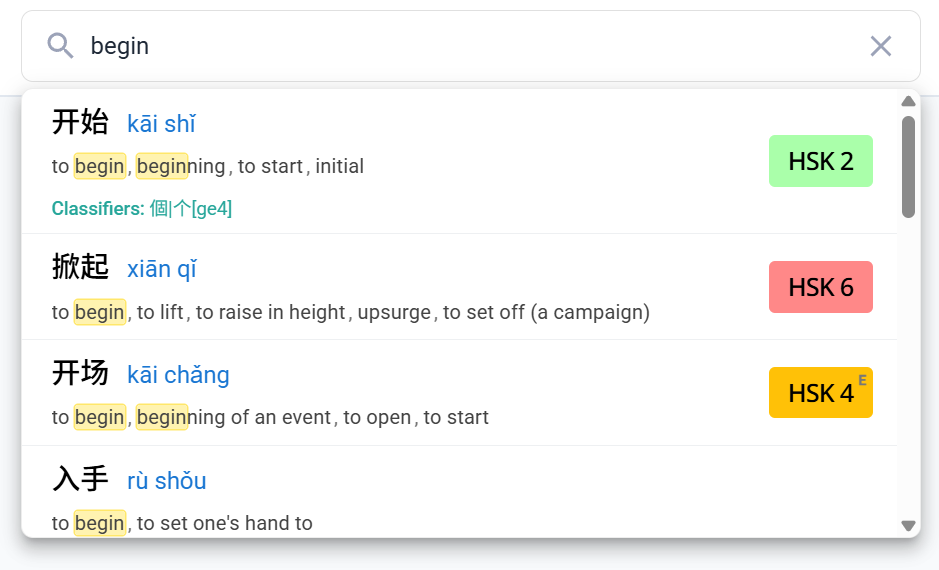
Supported Search Query Formats
The search bar accepts multiple input formats seamlessly:
- Search simplified characters directly:
比如,学习, or开始.
- Search syllables with tone numbers:
huo3guo1,bi3ru2, orkai1shi3.
- Search standard pinyin without tones or with accent marks:
biru,huoguo, orkāishǐ.
- Search by English meaning:
begin,for example,coffee, orteacher.
Desktop vs. Mobile Experience
Global Header Search
On desktop, the search bar is pinned to the top navigation header for fast access:
- Click into the search bar in the top navigation bar.
- Type your search term and click any matching result.
- The side Character Action Panel opens on the right side of the screen with stroke animations, audio, and definitions.
Character Breakdown & Actions
Whenever you select a word from search results (whether in the desktop Action Panel or the mobile Word Explorer modal), you have access to full character exploration tools:
- Stroke Order Animations: Watch animated handwriting strokes and toggle practice guidelines.
- Mark as Learned (): Flag words you already know to contribute to your HSK progression.
- Bookmark (): Save challenging words to your My Words queue.
- Example Sentences: Tap Show examples to see real-world usage sentences with audio.
Character Action Panel Guide
To learn more about stroke controls and definitions, check out our full Character Action Panel Guide.