
How to Link a Tutor
Connect with your private Mandarin tutor or coach on HanyuHub to receive assignments, custom study lists, and 1-on-1 feedback.
Overview
Linking your account connects you directly with your 1-on-1 Mandarin tutor or private coach. Once connected, your tutor can assign tailored reading passages, targeted vocabulary decks, and writing compositions directly to your My Tasks dashboard.
Step-by-Step Instructions
1. Open My Tasks
Navigate to My Tasks from the main navigation menu and locate the My Tutors card.
2. Click the Search Tutor Icon
Click the Search Tutor icon button in the top-right corner of the card header. Type your tutor's exact account email address and click Search.
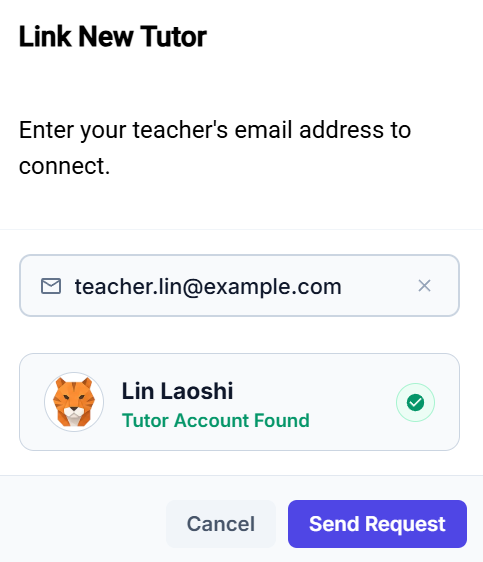
What Happens Next?
Once you send a connection request:
1. Pending Approval
Your request appears directly inside your My Tutors card with a Pending status badge. If you made a typo in their email address or want to cancel the request, click the Cancel button on that row.
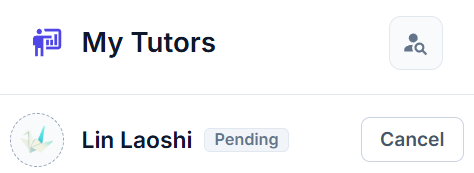
2. Tutor Notification & Response
- Your tutor receives an immediate alert in their dashboard to Approve or Decline your request.
- You will receive a notification banner as soon as your tutor responds.
3. Successfully Linked!
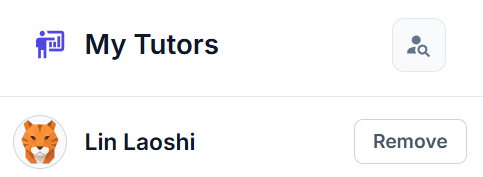
Once approved, the Pending badge is removed and the action switches to Remove. You are all set to receive personalized homework and practice tasks!
How to Remove a Linked Tutor
If you finish your coaching sessions, take a break from lessons, or switch to a new teacher, you can safely unlink from your tutor at any time:
1. Click Remove
Go to My Tasks, locate your teacher in the My Tutors list, and click the Remove button.
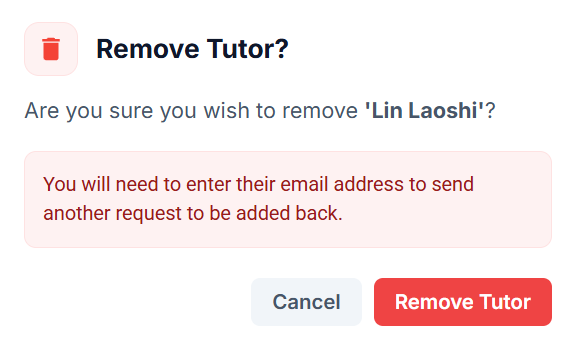
2. Confirm in Removal Dialog
A confirmation dialog will appear to prevent accidental unlinking. Click the red Remove Tutor button to confirm.
Reconnecting Later
If you remove a tutor by mistake or wish to reconnect in the future, simply click the search icon and enter their account email to send a new link request.