
Lessons
Master Mandarin step-by-step with structured modules combining vocabulary, grammar, reading, and tests.
Overview
Lessons bring all of HanyuHub's learning modalities together into a single, cohesive study journey. Instead of practicing vocabulary or grammar in isolation, a lesson guides you step-by-step—introducing target words, explaining grammar patterns, applying them in reading passages and dialogues, and testing your retention.
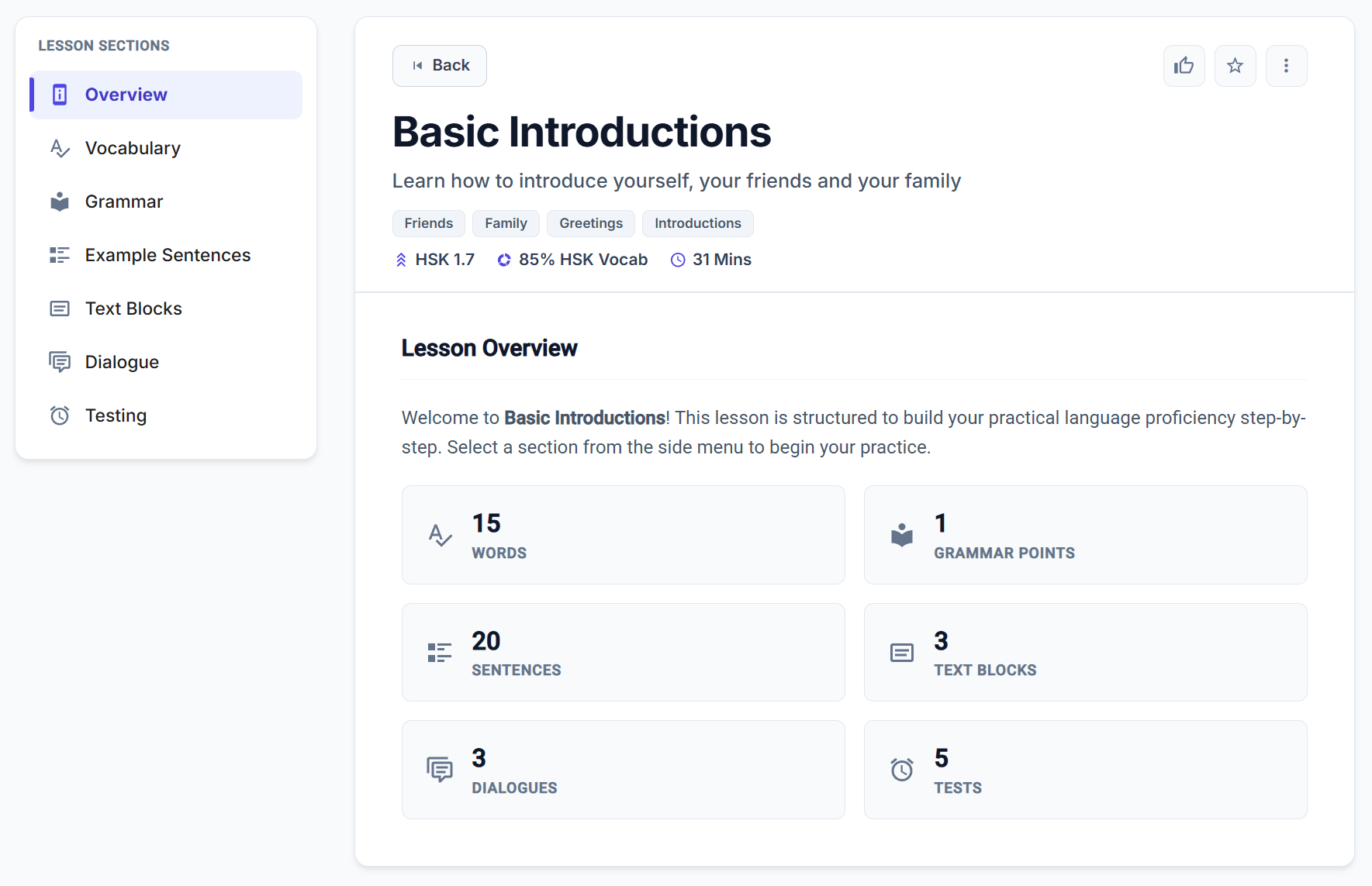
The 7-Stage Lesson Workflow
Use the Lesson Sections navigation (the left sidebar on desktop or the top scrolling bar on mobile) to move through each stage of the module:
1. Overview (Content Inventory)
- Displays the lesson's difficulty level, estimated study time (e.g.
⏱ 35 Mins), and a summary inventory of all content included in the module.
2. Vocabulary (Word Introduction)
- Introduces the core terms for the lesson. Includes stroke animations, definition pills, and quick launchers for Zen Review, Flashcards, or Vocab Tests.
- Learn more in Word Lists.
3. Grammar (Language Points)
- Breaks down sentence structure formulas, placement rules, and correct vs. incorrect examples for key grammar patterns.
- Learn more in Language Points.
4. Example Sentences
- Contextual example phrases demonstrating how the new vocabulary and grammar work together, complete with native audio playback.
- Learn more in Sentence Lists.
5. Text Blocks (Reading Immersion)
- Full paragraph reading passages designed to build reading stamina and natural character recognition with instant tap-to-translate lookups.
- Learn more in Articles.
6. Dialogue Practice
- Realistic multi-speaker conversational exchanges with distinct character voices and line-by-line audio replay.
- Learn more in Dialogues.
7. Testing (Mastery Check)
- A comprehensive quiz combining 4 interactive test engines to verify active recall, listening comprehension, and grammar synthesis before concluding the lesson.
The 4 Interactive Lesson Test Engines
When you reach the Testing section of a lesson, HanyuHub evaluates your comprehension through four distinct challenge types:
1. Word Selection (Cloze / Fill-in-the-Blank)
- Format: Sentences with missing character slots (
___) and a scrambled character bank at the top. - How to Answer: Tap a word in the selection bank to pick it up, then tap the target dashed slot in the sentence to place it. Tap any filled slot to return the character to the bank.
2. True / False Tests
- Format: A Chinese reading passage paired with numbered factual statements.
- How to Answer: Read the passage and use the segmented toggle on each row to mark the statement as True or False.
3. Sentence Builder (Reconstruct Sentence)
- Format: An English prompt sentence with a pool of scrambled Chinese character blocks below.
- How to Answer: Tap the Chinese character tiles in the correct grammatical order to translate the sentence. Tap placed tiles in the answer bar to remove them.
4. Context Questions (Reading Comprehension)
- Format: A reading passage followed by multiple-choice completion questions.
- How to Answer: Click Select an answer... on any question row to open the options popover, then choose the correct Chinese completion sentence (A, B, C, or D).
Submitting & Checking Answers
- Single Evaluation: When you finish all questions, click the Check Answers () button at the bottom of the test manager to grade all exercises at once.
- Instant Explanations: Incorrect answers display corrective feedback with Pinyin and English translations.
- Quiz Master Credit: Scoring ≥ 75% on any lesson test with 5 or more questions awards progress toward your Quiz Master Achievement Badge and completes your Complete a Test daily task.
Exporting Printable Lesson Study Booklets (PDF)
Prefer to study offline with pen and paper? You can compile any lesson into a formatted A4 printable study booklet in one click.
1. Open the Export Menu
Click the Export PDF () button in the top action bar (or choose Export PDF from the three-dots options menu).
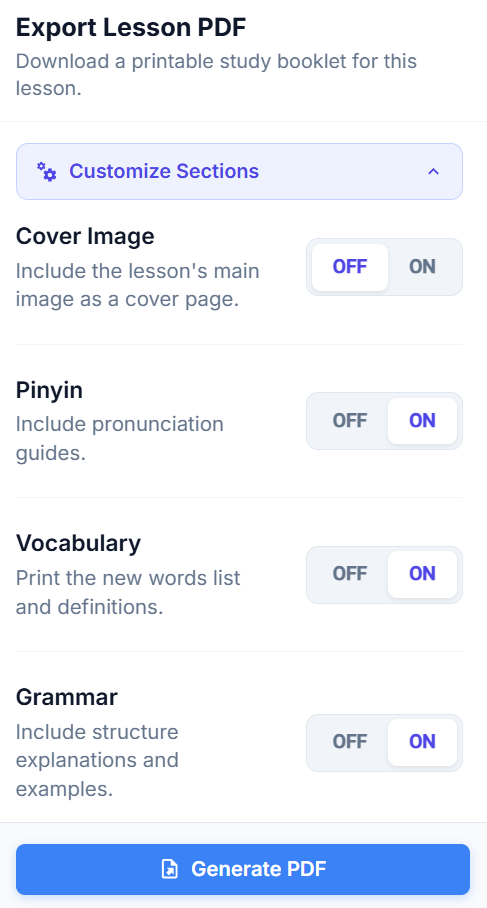
2. Customize Included Sections
Click Customize Sections to adjust your document layout:
- Visual & Formatting Controls:
- Cover Image: Shows or hides the lesson cover banner image at the top of the booklet.
- Pinyin: Adds or removes tone-marked pronunciation guides above all Chinese text across the entire document.
- Section Inclusions (Include or Exclude Entire Blocks):
- Vocabulary: Includes or excludes the new words list and definition table.
- Grammar: Includes or excludes grammar structure formulas, notes, and examples.
- Example Sentences: Includes or excludes standalone example phrases.
- Reading Passages: Includes or excludes reading text blocks and paragraphs.
- Dialogues: Includes or excludes conversational transcripts and speaker roles.
- Exercises & Tests: Includes or excludes worksheet tests, automatically appending an Answer Key at the back when enabled.
3. Save as Default & Generate
- Save as Default: Click Save as Default to store your layout preferences across all future lesson exports.
- Click Generate PDF to download your print-ready A4 booklet!
Flexible, Non-Linear Study
While lessons are ordered pedagogically from foundation to test, you have complete freedom:
- Jump to Any Section: Click any tab in the navigation bar or sidebar to jump directly to what you want to practice (e.g., skip straight to the Dialogue or review just the Grammar points).
- Tracked Study Time: Active time spent studying inside any lesson tab automatically logs toward your weekly goal and Learning Time Heatmap.