
How to Track Study Sessions (Timer, Finishing & Rating)
Learn how starting, pausing, and finishing study sessions updates your reading speed, character lookups, and word memory progress.
Overview
Whenever you read an article, dialogue, or lesson in HanyuHub, the Study Timer on the top toolbar tracks your active study duration and vocabulary lookups.
Timer Button States
1. Ready to Start (Begin)
Before you start reading, tap Begin () on the Reading Toolbar.
2. Active Running Timer (00:01)
Once started, the button transforms into a live running clock with an active pulse indicator.
3. Pause & Finish Session
Tapping the running timer button at any time pauses the clock and opens the Finish Study Session dialog.
The Finish Study Session Screen
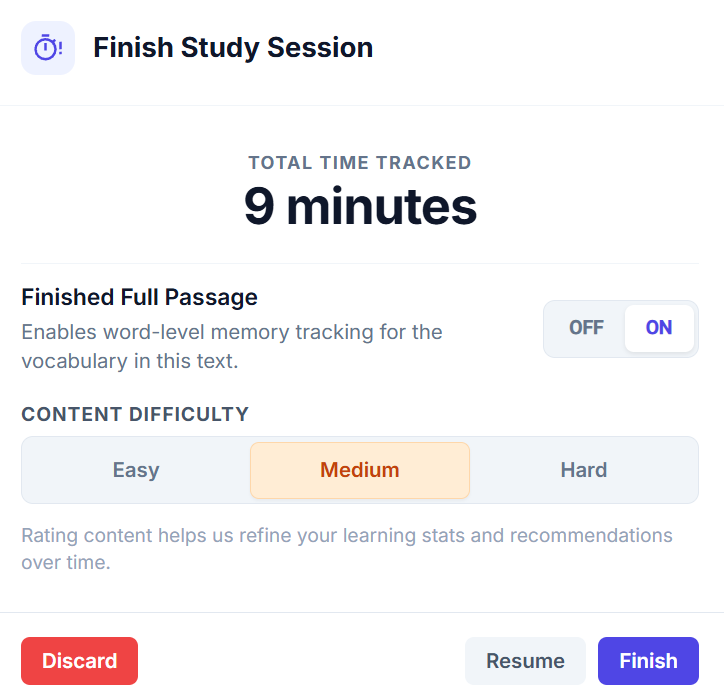
Total Time & Lookups Tracked
Measures your focused reading duration (excluding paused time) and records how many times you tapped characters for dictionary lookups.
Finished Full Passage Toggle
Enabling ON automagically credits memory progress to every word in the text that you read without needing to tap for a definition!
Content Difficulty Rating
Rate the passage as Easy, Medium, or Hard to refine your personalized learning stats and future content recommendations.
Finish / Resume / Discard Buttons
Click Finish to save your time, lookups, and memory scores to your profile. Click Resume to keep reading, or Discard to cancel tracking.
How Word-Level Memory Scoring Works
When Finished Full Passage is set to ON:
- Words you did NOT tap: Automatically receive a Successful Passive Recall credit in your memory queue, proving you recognized them in context without needing an English hint.
- Words you tapped for definitions: Are flagged for upcoming flashcard review.
Browsing, Searching & Filtering Content
Learn how to find content, filter by topic tags, sort by difficulty, and inspect library preview cards.
Understanding Reading Progression & Improvement Badges
See how your reading speed and character recognition improve over time as you revisit articles, dialogues, and sentence lists.